4 posts tagged with "devops"

View All Tags

Reducing LLM Costs Is Easy — Until Production Starts

· 5 min read
Founder of VCAL Project

Originally published on Dev.to on April 13, 2026.
Read the Dev.to version

A month ago, I wrote about reducing LLM costs using caching.

The idea is simple: don’t send the same or similar request to the model twice.

It works well in demos. It even works well in early testing.

And then production starts.


Production Reality: Where LLM Systems Start Breaking

At first, everything looks under control. Requests are small, traffic is predictable, and caching delivers immediate savings. You see fewer calls to the model and faster responses. It feels like the problem is solved.

But real systems don’t stay simple for long.

Prompts begin to grow. What used to be a short question turns into a long conversation with accumulated context, system instructions, and sometimes entire documents pasted by users. Requests become heavier, slower, and more expensive in ways that caching alone cannot fix.

At the same time, failures start to blur together. A timeout, a malformed request, and an upstream provider error all look the same from the outside. Without clear separation, debugging becomes guesswork, and cost anomalies become difficult to explain.

Then there’s latency. A request times out — but what actually happened? Was the provider slow? Did the request even reach it? Should you retry it or not? Without visibility into upstream behavior, you’re operating blind.

Even semantic caching, which looks almost magical at first, becomes a tuning problem. Similarity thresholds that worked in testing suddenly feel off. Some responses are reused too aggressively, others not at all. Without insight into what the system is actually doing, you’re left adjusting numbers and hoping for the best. This is all similar to how prompts are tuned — but here, the feedback loop is missing.

Finally, the moment that exposes everything: deployment.

You restart the service during traffic, and suddenly there are dropped requests, inconsistent responses, and unpredictable behavior. What worked perfectly in isolation now reveals gaps in lifecycle handling.


The Missing Layer: LLM Systems Have No Traffic Control

What all of this points to is a deeper issue.

LLM applications don’t just need optimization. They need a control layer.

In traditional systems, we never send traffic directly to application logic. There is always a layer in front — something that validates, routes, filters, and observes. Tools like Nginx became essential not because they were convenient, but because they made systems predictable.

LLM systems are now facing the same reality.


From Calling Models to Controlling Requests

When you introduce a control layer in front of LLMs, the perspective changes.

The question is no longer just “how do I call the model?” but “should this request reach the model at all?”

Is it valid? Has it already been answered? What happens if it fails?

Cost optimization becomes a side effect of something bigger: managing traffic properly.


From Caching to Control: What Changed in Real Deployments

This is where the AI Cost Firewall evolved.

It started as a caching layer — combining exact matches in Redis with semantic search in Qdrant. That alone reduced a significant portion of redundant requests.

But real deployments made it clear that caching is only the beginning. The system needed to behave predictably under load, during failures, and across deployments. So the focus shifted.

Readiness and liveness became explicit, separating a healthy process from one that is actually ready to handle traffic. Shutdown behavior was redesigned to drain in-flight requests instead of dropping them. Restarts became controlled events rather than risky moments.

Errors were no longer just errors. They were classified: validation issues, upstream timeouts, provider failures, internal faults — each telling a different story about what went wrong.

Upstream behavior stopped being a black box. Latency became measurable, timeouts became visible, and slow responses could finally be distinguished from real failures.

Semantic caching also became observable. Instead of guessing whether it works, you can now see how many candidates are evaluated, how often thresholds pass or fail, and how long lookups take. What used to feel like a heuristic now becomes something you can tune with confidence.

And perhaps most importantly, the system itself became visible while it runs. You can tell whether it is ready, whether it is shutting down, and how it behaves under real traffic — not just in theory.

At this point, semantic caching stops being a black box.

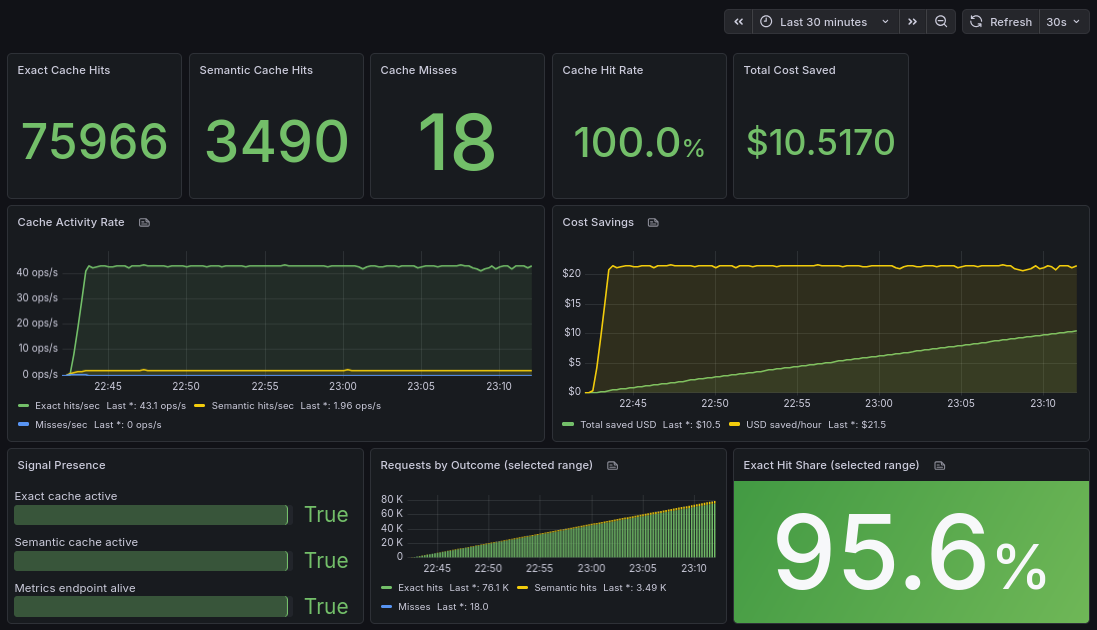
This is what diagnostics visibility looks like in practice:
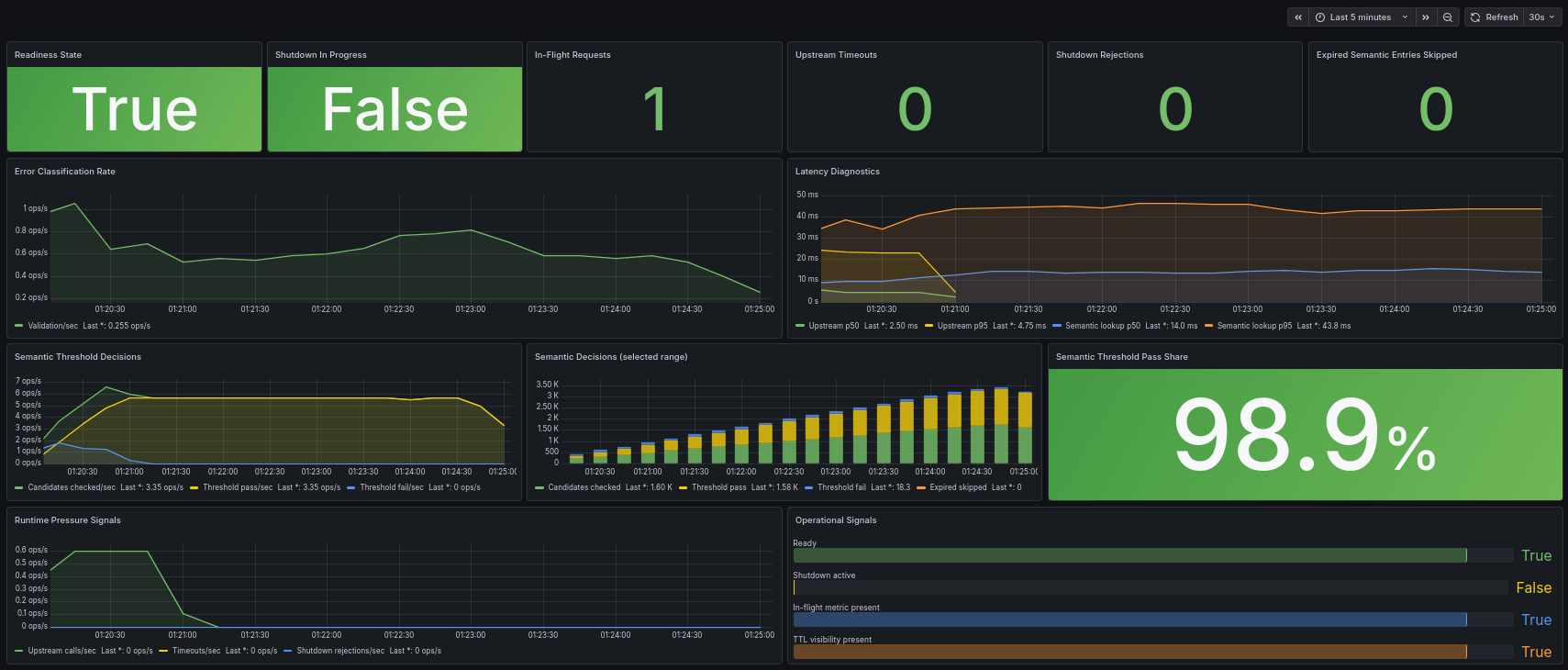
Screenshot: AI Cost Firewall Diagnostics Dashboard

Instead of guessing thresholds, you now have feedback. Instead of assumptions, you have data.


Why Predictability Matters More Than Features

None of these changes are flashy.

They don’t improve model quality or add new capabilities.

But they solve something more fundamental: they make the system predictable.

And without predictability, cost optimization doesn’t hold.


Caching Starts It, Control Makes It Work

Reducing LLM costs is easy when everything is controlled and small.

It becomes difficult when requests grow, failures mix together, and systems need to operate continuously under real conditions.

At that point, the problem is no longer about saving tokens. It’s about understanding and controlling the flow of requests before they ever reach the model.

Caching is where it starts. Control is what makes it work in production.


If you want to experiment with the tool, the AI Cost Firewall project is open-source and designed to run as a drop-in OpenAI-compatible gateway in front of existing applications:

https://github.com/vcal-project/ai-firewall

Built and maintained by the VCAL Project team — feedback and real-world use cases are very welcome.
How to Reduce OpenAI API Costs with Semantic Caching

· 6 min read
Founder of VCAL Project

Originally published on Medium.com on March 21, 2026.
Read the Medium.com version

A simple OpenAI-compatible gateway that eliminates duplicate requests and cuts token usage

While working on LLM-powered tools for my customer, I kept seeing something that didn’t feel right.

Users were asking the same or similar questions again and again. Support queries repeated. Internal assistants received nearly identical prompts. Even AI agents were looping through similar requests.

At first, it didn’t look like a problem. That’s just how users behave.

But then I looked at the cost.

Every repeated question meant another API call. Another batch of tokens. Another charge. Over time, it added up more than was expected.

I realized something simple:

We are paying multiple times for the same answer.


Why Existing Solutions Didn’t Quite Work

Initially I looked at the available tools.

Redis helped with exact caching, but only when the prompt was identical. The moment a user rephrased the question slightly, the cache missed. “How do I get access to Jira?” and “Cannot get access to Jira” were treated as completely different requests.

I also explored RedisVL, which brings vector search capabilities into Redis. It moves in the right direction by combining caching and similarity in one place. But in practice, it still requires setting up embedding flows, defining schemas, tuning similarity thresholds, and integrating it manually into the LLM request pipeline.

Vector databases like Milvus, Weaviate, or Qdrant seemed promising as well. They can detect semantic similarity effectively, but integrating them into the request flow means building additional pipelines, managing embeddings, and writing glue code.

All of these tools are powerful, but they aren’t simple.

More importantly, none of them are designed as a drop-in layer in front of an LLM API. There was no unified solution that combined caching, semantic matching, and cost awareness in one place.


What I Built Instead

At some point, I decided to take a step back and ask a simple question:

What if we just put one smart layer in front of the LLM?

That’s how the AI Cost Firewall started.

Instead of modifying applications or adding complex pipelines, AI Firewall intercepts requests before they reach the model. If it’s already seen a similar request, it returns the cached response. If not, it forwards it, stores the result, and moves on.

From the application’s perspective, nothing changes. It still talks to an OpenAI-compatible API.

But behind the scenes, unnecessary calls disappear.


How It Works (Without the Complexity)

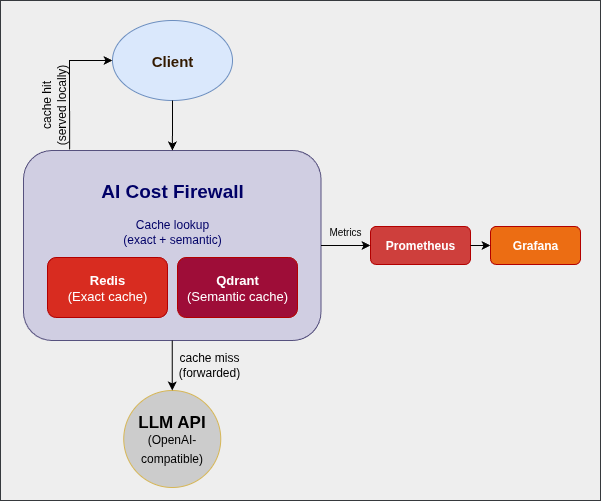
Screenshot: AI Cost Firewall Architecture

I intentionally kept the architecture minimal.

At the core, there’s a Rust-based API gateway that speaks the same language as the OpenAI API. For caching, I use Redis for exact matches and Qdrant for semantic similarity. Prometheus and Grafana provide visibility into what’s happening.

A request comes in, we check the cache, and only if needed do we call the LLM.

That’s it.

No SDK rewrites. No major architectural changes. Just one additional layer.


Why I Chose Rust

Since this component sits directly in the request path, performance matters.

I chose Rust because it provides low latency and predictable performance without garbage collection pauses. It handles concurrency well and keeps the memory footprint small, which makes it ideal for containerized deployments.

Most importantly, we can trust it not to become the bottleneck.

Why I Open-Sourced It

This layer sits between the application and the AI provider. That’s a sensitive place.

I felt it had to be transparent and auditable. Open source makes it easier to trust, easier to adopt, and easier to extend.

It also keeps the core idea simple: reducing costs shouldn’t introduce new risks or lock you into a vendor.


Getting Started in Minutes

I wanted the setup to be as simple as possible.

Clone the repository, start Docker, and point your application to a new endpoint.

git clone https://github.com/vcal-project/ai-firewall
cd ai-firewall
cp configs/ai-firewall.conf.example configs/ai-firewall.conf
nano configs/ai-firewall.conf # Replace the placeholders with your API keys
docker compose up -d

After that, you just replace your API base URL with:

http://localhost:8080/v1/chat/completions

That’s the entire integration.


What Changed for Me

Once I started using this approach, two things became obvious.

First, a surprisingly large portion of requests was served directly from cache. The reason? All of them were already answered before.

Second, response times improved whenever the cache was hit.

I didn’t need to optimize prompts or switch models to see an effect. Just avoiding redundant calls made a noticeable difference.

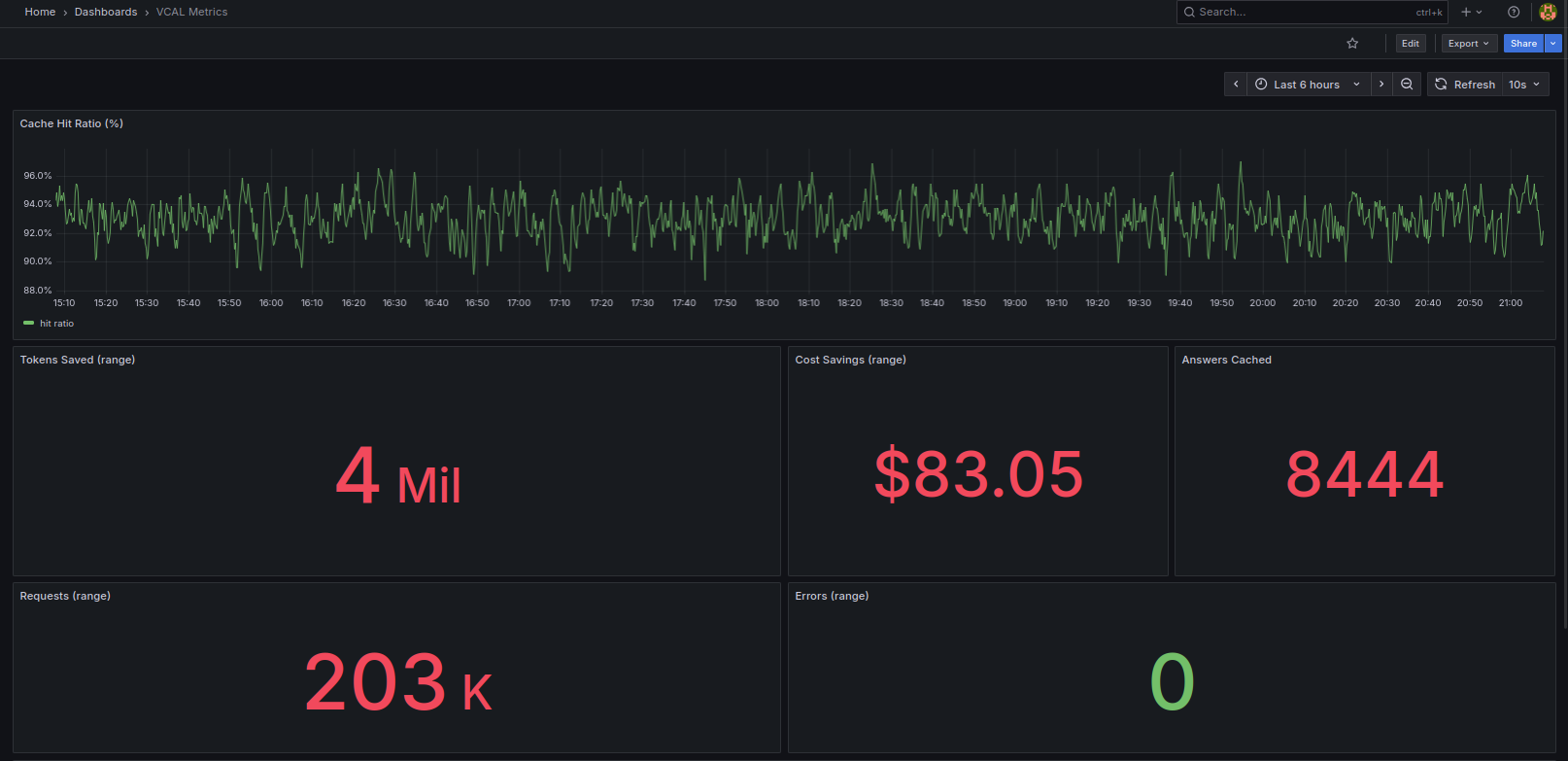
To make this visible, I add a simple Grafana dashboard.

It shows how many requests are served from cache vs forwarded to the LLM, along with the estimated cost savings in real time.

Screenshot: Grafana dashboard showing cache hits and cost saving

The key metrics are:

  • cache hit ratio (how many requests never reach the LLM)
  • total tokens saved
  • estimated cost savings

What surprised me most was how quickly the savings accumulated even with relatively small traffic.


What Comes Next

I see this as a starting point rather than a finished product.

Next, I’m focusing on adding support for other LLM providers beyond OpenAI. Expanding analytics is another priority, along with exploring multi-model setups and smarter routing.

There’s still a lot to build — and that’s exactly the point.


Final Thoughts

AI costs don’t spike all at once. They grow quietly, request by request.

And in many cases, a large part of that cost is unnecessary.

We didn’t need a more complex system to reduce it. We just needed to stop sending the same request twice.

Sometimes the most effective optimization is the simplest one:

Not calling the model at all.


If you’re running LLM-powered tools and want to reduce costs without changing your application architecture, you can try it here:

https://github.com/vcal-project/ai-firewall

AI Cost Firewall: An OpenAI-Compatible Gateway That Cuts LLM Costs by 75%

· 9 min read
Founder of VCAL Project

Originally published on Dev.to on March 16, 2026.
Read the Dev.to version

Exact + semantic caching for AI applications


In today’s era of AI adoption, there is a distinct shift from integrating AI solutions into business processes to controlling the costs, be it the costs of a cloud solution, a local LLM deployment, or the cost of tokens spent in chatbots. If your solution includes repeated questions and uses an OpenAI-compatible model, and if you are looking for a simple, free and effective way to immediately cut your company’s daily token costs, there is one infrastructural solution that does it right out of the box.

AI Cost Firewall is a free open-source API gateway that decides which requests actually need to reach the LLM and which can be answered from previous results without additional token costs.

The gateway consists of a Rust-based firewall “decider”, a Redis database, a Qdrant vector store, Prometheus for metrics scraping, and Grafana for monitoring. All the tools are deployed with a single docker compose command and are available for use in less than a minute.

Once deployed, AI Cost Firewall sits transparently between your application and the LLM provider. Your chatbot, AI assistant, or internal automation continues to send requests exactly the same way as before with the only difference that the API endpoint now points to the firewall instead of directly to the model provider. The firewall then performs an instant check before deciding whether the request should actually reach the LLM and raise your monthly bill.


How the firewall reduces token costs

AI Cost Firewall eliminates unnecessary token spends using two layers of caching.

Exact match cache (Redis / Valkey)

The first step is an extremely fast exact request match check. Each incoming request is normalized and hashed. If an identical request was previously processed, the firewall immediately returns the stored response from Redis. This lookup takes microseconds and costs zero tokens. For workloads with frequent identical prompts such as customer support or internal documentation assistants this alone can already reduce a significant portion of LLM traffic.

Semantic cache (Qdrant)

The second layer addresses the case of semantic similarity: questions are similar but not identical.

For example:

User A: Provide a one-sentence explanation of what Kubernetes is.
User B: What is Kubernetes? Give me a one-sentence explanation.

Even though the wording differs, the semantic value and thus meaning of these questions is essentially the same (if you are interested in what semantics in AI is, have a look at my article From words to vectors: how semantics traveled from linguistics to Large Language Models).

To detect these situations, AI Cost Firewall uses a semantic vector search. Each request is embedded using a lightweight embedding model, and the resulting vector is compared against previously stored queries using Qdrant, a high-performance vector database designed specifically for this. If the similarity score exceeds a certain threshold, the firewall returns the previously generated answer instead of sending the request to the LLM again. In this way, a single LLM response can be reused dozens or even hundreds of times without extra tokens expense.

Forwarding only when necessary

If neither the exact cache nor the semantic cache contains a suitable answer, the firewall forwards the request to your upstream model provider. Besides being provided to the user, the returned response is then stored in both Redis and Qdrant for future reuse. The workflow therefore becomes (simplified):

Client → AI Cost Firewall

Redis check

Qdrant semantic check

(only if needed)

LLM API

The LLM is only called when a genuinely new question appears.

With this approach, the AI Cost Firewall does not only save the costs but also rockets the response time improving the users’ satisfaction (Customer Satisfaction Score, CSAT).


OpenAI compatible by design

One of the most practical aspects of AI Cost Firewall is that you do not have to touch your application to integrate it. What you do is you simply switch the base URL to the firewall’s endpoint:

client = OpenAI(
base_url="http://localhost:8080/v1"
)

From the application’s perspective, nothing changes. The same requests and responses flow through the system. However, now the firewall intelligently “decides” whether the model actually needs to be called and the money has to be spent.

This tool is compatible with:

  • OpenAI models
  • Azure OpenAI
  • local OpenAI-compatible servers
  • many hosted inference platforms

In other words, any system that already works with the OpenAI API can immediately benefit from cost reduction. And more than that, other models are going to be added soon by the project developers.


Observability built in

One of the integrated features of the AI Cost Firewall is its built-in monitoring. It consists of Prometheus for scraping the metrics and integrated Grafana Dashboard. Both services are launched automatically by docker compose using preconfigured Prometheus YAML and a prebuilt Grafana dashboard JSON, so the monitoring stack is ready immediately without any manual configuration.

Prometheus metrics allow you to track:

  • number of cache hits
  • semantic matches
  • forwarded requests
  • estimated cost savings
  • active requests

You can immediately visualize these metrics with the Grafana dashboard to see exactly how much the firewall is saving in real time (with a 5-second delay to be honest).


Why it works well

AI Cost Firewall works because it targets a structural characteristic present in almost every LLM application:

  • repeated user questions
  • overlapping knowledge queries
  • duplicated agent prompts

By caching responses and using semantic similarity search, the system converts repeated LLM calls into near-zero-cost lookups.

Why near-zero and not fully zero? Because semantic matching still requires generating embeddings for incoming queries. However, embedding costs are typically orders of magnitude lower than generating full LLM responses.

Another advantage of the firewall is its intentionally minimal architecture:

  • Rust firewall gateway
  • Redis for exact caching
  • Qdrant for semantic caching
  • Prometheus + Grafana for monitoring

This simplicity makes it easy to deploy, maintain, and scale.


When AI Cost Firewall is most effective

The biggest savings with AI Firewall occur in systems where similar questions appear frequently. You will immediately benefit from the AI Cost Firewall integration if your system includes any or several of the following components:

  • customer support chatbots
  • internal company knowledge assistants
  • documentation Q&A systems
  • developer copilots
  • AI help desks
  • AI Agents performing any of the above tasks

In these environments, the same core questions appear repeatedly across many users. Even when questions are phrased differently, the semantic cache can reuse the same answer multiple times.

Advanced users may also appreciate the integrated TTL (Time-to-Live) feature which allows you to set up the duration of the response kept in Redis’s memory before replaced with a newly generated one. The same feature for Qdrant is currently under development and will be introduced soon.


Try it in 60 seconds

If you want to see how AI Cost Firewall works, you can deploy the whole stack locally or on a small server in less than a minute.

Example:

git clone https://github.com/vcal-project/ai-firewall
cd ai-firewall
cp configs/ai-firewall.conf.example configs/ai-firewall.conf
nano configs/ai-firewall.conf # Replace the placeholders with your API keys
docker compose up -d

This launches:

  • AI Cost Firewall
  • Redis (exact cache)
  • Qdrant (semantic cache)
  • Prometheus (metrics scraping)
  • Grafana (monitoring dashboard)

Once the containers start, simply point your OpenAI client to:

http://localhost:8080/v1

Within seconds, the gateway is ready to accept OpenAI-compatible requests. Similar to Nginx and other infrastructure gateways, you only need to add your API keys to the configuration file. From that point on, every request automatically passes through the cost-saving pipeline while previous responses are stored in Redis and Qdrant for future reuse.

Because the gateway itself is stateless, multiple firewall instances can be deployed behind a load balancer, allowing the system to scale horizontally with growing traffic.

                         ┌───────────────────────┐
│ Clients │
│ Chatbots / Agents / │
│ Internal AI Apps │
└───────────┬───────────┘


┌───────────────────────┐
│ Load Balancer │
│ Nginx / HAProxy │
└───────────┬───────────┘

┌────────────────────┼────────────────────┐
│ │ │
▼ ▼ ▼
┌──────────────────┐ ┌──────────────────┐ ┌──────────────────┐
│ AI Cost Firewall │ │ AI Cost Firewall │ │ AI Cost Firewall │
│ instance 1 │ │ instance 2 │ │ instance 3 │
└─────────┬────────┘ └─────────┬────────┘ └─────────┬────────┘
│ │ │
└─────────────┬───────┴───────────┬─────────┘
│ │
▼ ▼
┌──────────────────┐ ┌──────────────────┐
│ Redis / Valkey │ │ Qdrant │
│ Exact cache │ │ Semantic cache │
└─────────┬────────┘ └─────────┬────────┘
│ │
└──────────┬───────────┘


┌───────────────────────┐
│ Upstream LLM API │
│ OpenAI / Azure / vLLM │
└───────────────────────┘


┌─────────────────────── Observability Stack ─────────────────┐
│ │
│ AI Cost Firewall metrics ─────► Prometheus ─────► Grafana │
│ │
└─────────────────────────────────────────────────────────────┘

Architecture of a horizontally scalable AI Cost Firewall deployment.


Conclusion

With the growing adoption of AI, it is sometimes painful to watch the steady increase of company expenses related to LLM tokens. Large Language Models are extremely powerful, but they can also become quite expensive when used at scale. It feels even more unfair when you realize that a significant portion of LLM traffic consists of repeated or semantically similar questions.

AI Cost Firewall addresses this inefficiency with a simple idea: do not send the same or similar question to the model again and again. Instead, reuse answers that were already generated for identical or semantically similar queries.

By combining exact caching with semantic similarity search, the firewall allows previously generated answers to be reused safely and efficiently. The result is lower token consumption, faster responses, and reduced infrastructure costs.

Because the gateway is OpenAI-compatible, integration requires only a small configuration change. No application refactoring is needed. If your system includes chatbots, knowledge assistants, developer copilots, or AI agents that answer recurring questions, AI Cost Firewall can reduce token usage by 30–75% immediately after deployment.

And since the entire stack runs with a single docker compose command, you can try it in minutes.

Sometimes the most effective optimization is not a new model, a larger GPU cluster, or a complex architecture.

Sometimes it is simply not paying twice for the same answer.


If you find this open-source project useful, a GitHub star will help the project grow.

https://github.com/vcal-project/ai-firewall

How I Created a Semantic Cache Library for AI

· 4 min read
Founder of VCAL Project

Originally published on Dev.to on October 27, 2025.
Read the Dev.to version

Cover

Have you ever wondered why LLM apps get slower and more expensive as they scale, even though 80% of user questions sound pretty similar? That’s exactly what got me thinking recently: why are we constantly asking the model the same thing?

That question led me down the rabbit hole of semantic caching, and eventually to building VCAL (Vector Cache-as-a-Library), an open-source project that helps AI apps remember what they’ve already answered.


The “Eureka!” Moment

It started while optimizing an internal support chatbot that ran on top of a local LLM. Logs showed hundreds of near-identical queries:

“How do I request access to the analytics dashboard?”
“Who approves dashboard access for my team?”
“My access to analytics was revoked — how do I get it back?”

Each one triggered a full LLM inference: embedding the query, generating a new answer, and consuming hundreds of tokens even though all three questions meant the same thing.

So I decided to create a simple library that would embed each question, compare it to what was submitted earlier, and if it’s similar enough, return the stored answer instead of generating an LLM response, all this before asking the model.

I wrote a prototype in Rust — for performance and reliability — and designed it as a small vcal-core open-source library that any app could embed.

The first version of VCAL could:

  • Store and search vector embeddings in RAM using HNSW graph indexing
  • Handle TTL and LRU evictions automatically
  • Save snapshots to disk so it could restart fast

Later came VCAL Server, a drop-in HTTP API version for teams that wanted to cache answers across multiple services while deploying it on-prem or in a cloud.

Screenshot: Grafana dashboard showing cache hits and cost saving


What It Feels Like to Use

Unlike a full vector database, VCAL isn’t designed for long-term storage or analytics. I didn’t want to build another vector database.
VCAL is intentionally lightweight. It is a fast, in-memory semantic cache optimized for repeated LLM queries.

Integrating VCAL takes minutes.
Instead of calling the model directly, you send your query to VCAL first.
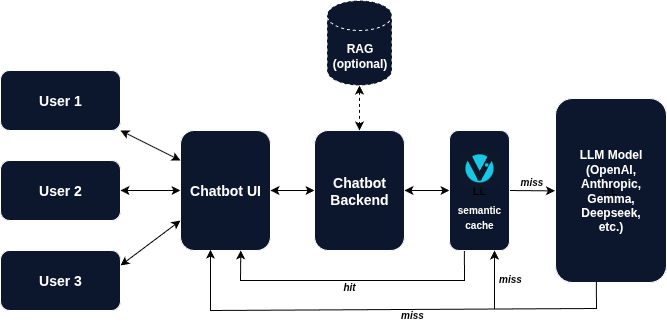
If a similar question has been asked before — and the similarity threshold can be tuned — VCAL returns the answer from its cache in milliseconds. If it’s a new question, VCAL asks the LLM, stores the result, and returns it.
Next time, if a semantically similar question comes in, VCAL answers instantly.

It’s like adding a memory layer between your app and the model — lightweight, explainable, and under your full control.

Flow diagram: user → VCAL → LLM


Lessons Learned

  • LLMs love redundancy. Once you start caching semantically, you realize how often people repeat the same question with different words.
  • Caching semantics ≠ caching text. Cosine similarity and vector distances matter more than exact matches.
  • Performance scales beautifully. A well-tuned cache can handle thousands of lookups per second, even on modest hardware.
  • It scales big. A single VCAL Server instance can comfortably store and serve up to 10 million cached answers in memory, depending on embedding dimensions and hardware.

What’s Next

We’re now working on a licensing server, enterprise snapshot formats, and RAG-style extensions, so teams can use VCAL not just for Q&A caching, but as the foundation for private semantic memory.

If you’re building AI agents, support desks, or knowledge assistants, you’ll likely benefit from giving your system a brain that remembers.

You can explore more at vcal-project.com - try the free 30-day Trial Evaluation of VCAL Server or jump into the open-source vcal-core version on GitHub.


Thanks for reading!
If this resonates with you, please drop a comment. I’d love to hear how you’re approaching caching and optimization for AI apps.