How to Reduce OpenAI API Costs with Semantic Caching
Originally published on Medium.com on March 21, 2026.
Read the Medium.com version
A simple OpenAI-compatible gateway that eliminates duplicate requests and cuts token usage
While working on LLM-powered tools for my customer, I kept seeing something that didn’t feel right.
Users were asking the same or similar questions again and again. Support queries repeated. Internal assistants received nearly identical prompts. Even AI agents were looping through similar requests.
At first, it didn’t look like a problem. That’s just how users behave.
But then I looked at the cost.
Every repeated question meant another API call. Another batch of tokens. Another charge. Over time, it added up more than was expected.
I realized something simple:
We are paying multiple times for the same answer.
Why Existing Solutions Didn’t Quite Work
Initially I looked at the available tools.
Redis helped with exact caching, but only when the prompt was identical. The moment a user rephrased the question slightly, the cache missed. “How do I get access to Jira?” and “Cannot get access to Jira” were treated as completely different requests.
I also explored RedisVL, which brings vector search capabilities into Redis. It moves in the right direction by combining caching and similarity in one place. But in practice, it still requires setting up embedding flows, defining schemas, tuning similarity thresholds, and integrating it manually into the LLM request pipeline.
Vector databases like Milvus, Weaviate, or Qdrant seemed promising as well. They can detect semantic similarity effectively, but integrating them into the request flow means building additional pipelines, managing embeddings, and writing glue code.
All of these tools are powerful, but they aren’t simple.
More importantly, none of them are designed as a drop-in layer in front of an LLM API. There was no unified solution that combined caching, semantic matching, and cost awareness in one place.
What I Built Instead
At some point, I decided to take a step back and ask a simple question:
What if we just put one smart layer in front of the LLM?
That’s how the AI Cost Firewall started.
Instead of modifying applications or adding complex pipelines, AI Firewall intercepts requests before they reach the model. If it’s already seen a similar request, it returns the cached response. If not, it forwards it, stores the result, and moves on.
From the application’s perspective, nothing changes. It still talks to an OpenAI-compatible API.
But behind the scenes, unnecessary calls disappear.
How It Works (Without the Complexity)
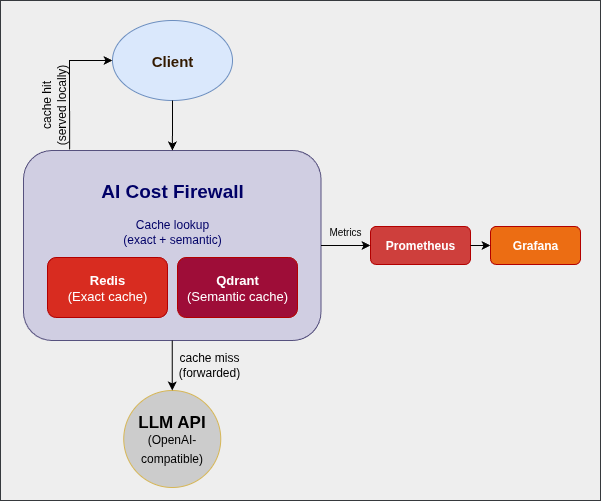
I intentionally kept the architecture minimal.
At the core, there’s a Rust-based API gateway that speaks the same language as the OpenAI API. For caching, I use Redis for exact matches and Qdrant for semantic similarity. Prometheus and Grafana provide visibility into what’s happening.
A request comes in, we check the cache, and only if needed do we call the LLM.
That’s it.
No SDK rewrites. No major architectural changes. Just one additional layer.
Why I Chose Rust
Since this component sits directly in the request path, performance matters.
I chose Rust because it provides low latency and predictable performance without garbage collection pauses. It handles concurrency well and keeps the memory footprint small, which makes it ideal for containerized deployments.
Most importantly, we can trust it not to become the bottleneck.
Why I Open-Sourced It
This layer sits between the application and the AI provider. That’s a sensitive place.
I felt it had to be transparent and auditable. Open source makes it easier to trust, easier to adopt, and easier to extend.
It also keeps the core idea simple: reducing costs shouldn’t introduce new risks or lock you into a vendor.
Getting Started in Minutes
I wanted the setup to be as simple as possible.
Clone the repository, start Docker, and point your application to a new endpoint.
git clone https://github.com/vcal-project/ai-firewall
cd ai-firewall
cp configs/ai-firewall.conf.example configs/ai-firewall.conf
nano configs/ai-firewall.conf # Replace the placeholders with your API keys
docker compose up -d
After that, you just replace your API base URL with:
http://localhost:8080/v1/chat/completions
That’s the entire integration.
What Changed for Me
Once I started using this approach, two things became obvious.
First, a surprisingly large portion of requests was served directly from cache. The reason? All of them were already answered before.
Second, response times improved whenever the cache was hit.
I didn’t need to optimize prompts or switch models to see an effect. Just avoiding redundant calls made a noticeable difference.
To make this visible, I add a simple Grafana dashboard.
It shows how many requests are served from cache vs forwarded to the LLM, along with the estimated cost savings in real time.
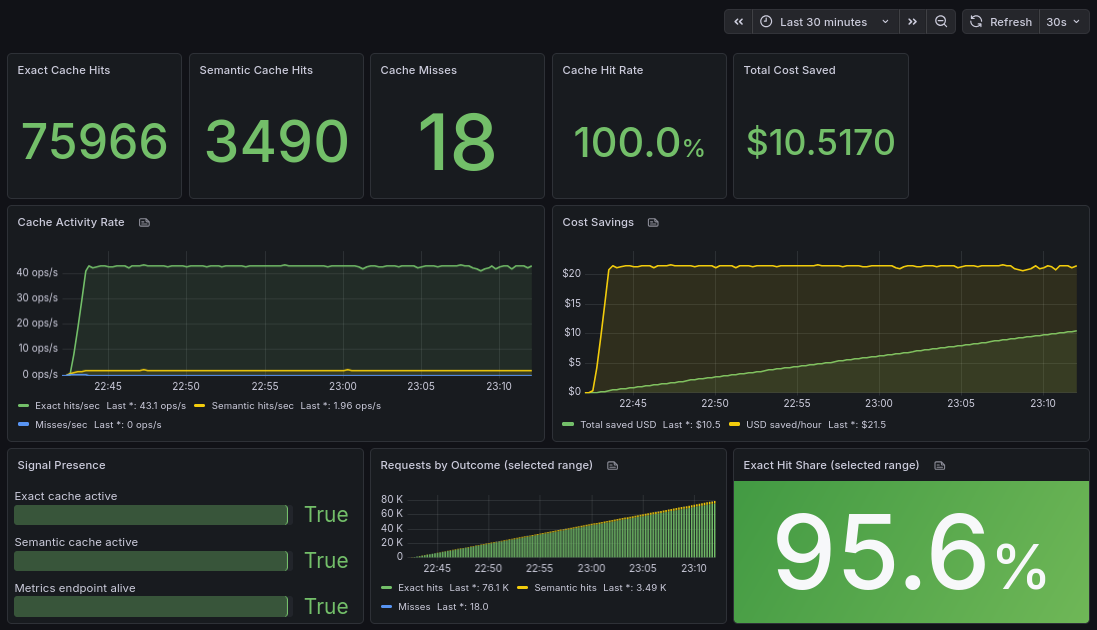
The key metrics are:
- cache hit ratio (how many requests never reach the LLM)
- total tokens saved
- estimated cost savings
What surprised me most was how quickly the savings accumulated even with relatively small traffic.
What Comes Next
I see this as a starting point rather than a finished product.
Next, I’m focusing on adding support for other LLM providers beyond OpenAI. Expanding analytics is another priority, along with exploring multi-model setups and smarter routing.
There’s still a lot to build — and that’s exactly the point.
Final Thoughts
AI costs don’t spike all at once. They grow quietly, request by request.
And in many cases, a large part of that cost is unnecessary.
We didn’t need a more complex system to reduce it. We just needed to stop sending the same request twice.
Sometimes the most effective optimization is the simplest one:
Not calling the model at all.
If you’re running LLM-powered tools and want to reduce costs without changing your application architecture, you can try it here: