AI Cost Firewall: An OpenAI-Compatible Gateway That Cuts LLM Costs by 75%
Originally published on Dev.to on March 16, 2026.
Read the Dev.to version
Exact + semantic caching for AI applications
In today’s era of AI adoption, there is a distinct shift from integrating AI solutions into business processes to controlling the costs, be it the costs of a cloud solution, a local LLM deployment, or the cost of tokens spent in chatbots. If your solution includes repeated questions and uses an OpenAI-compatible model, and if you are looking for a simple, free and effective way to immediately cut your company’s daily token costs, there is one infrastructural solution that does it right out of the box.
AI Cost Firewall is a free open-source API gateway that decides which requests actually need to reach the LLM and which can be answered from previous results without additional token costs.
The gateway consists of a Rust-based firewall “decider”, a Redis database, a Qdrant vector store, Prometheus for metrics scraping, and Grafana for monitoring. All the tools are deployed with a single docker compose command and are available for use in less than a minute.
Once deployed, AI Cost Firewall sits transparently between your application and the LLM provider. Your chatbot, AI assistant, or internal automation continues to send requests exactly the same way as before with the only difference that the API endpoint now points to the firewall instead of directly to the model provider. The firewall then performs an instant check before deciding whether the request should actually reach the LLM and raise your monthly bill.
How the firewall reduces token costs
AI Cost Firewall eliminates unnecessary token spends using two layers of caching.
Exact match cache (Redis / Valkey)
The first step is an extremely fast exact request match check. Each incoming request is normalized and hashed. If an identical request was previously processed, the firewall immediately returns the stored response from Redis. This lookup takes microseconds and costs zero tokens. For workloads with frequent identical prompts such as customer support or internal documentation assistants this alone can already reduce a significant portion of LLM traffic.
Semantic cache (Qdrant)
The second layer addresses the case of semantic similarity: questions are similar but not identical.
For example:
User A: Provide a one-sentence explanation of what Kubernetes is.
User B: What is Kubernetes? Give me a one-sentence explanation.
Even though the wording differs, the semantic value and thus meaning of these questions is essentially the same (if you are interested in what semantics in AI is, have a look at my article From words to vectors: how semantics traveled from linguistics to Large Language Models).
To detect these situations, AI Cost Firewall uses a semantic vector search. Each request is embedded using a lightweight embedding model, and the resulting vector is compared against previously stored queries using Qdrant, a high-performance vector database designed specifically for this. If the similarity score exceeds a certain threshold, the firewall returns the previously generated answer instead of sending the request to the LLM again. In this way, a single LLM response can be reused dozens or even hundreds of times without extra tokens expense.
Forwarding only when necessary
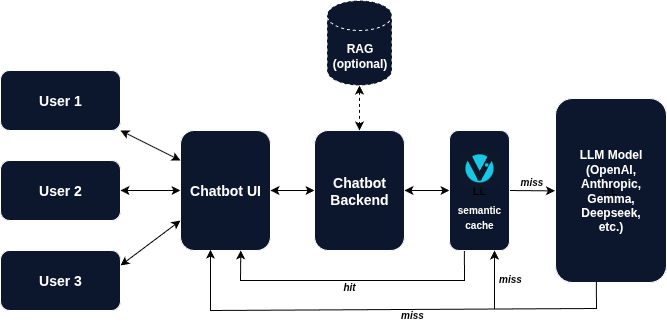
If neither the exact cache nor the semantic cache contains a suitable answer, the firewall forwards the request to your upstream model provider. Besides being provided to the user, the returned response is then stored in both Redis and Qdrant for future reuse. The workflow therefore becomes (simplified):
Client → AI Cost Firewall
           ↓
      Redis check
           ↓
     Qdrant semantic check
           ↓
   (only if needed)
           ↓
        LLM API
The LLM is only called when a genuinely new question appears.
With this approach, the AI Cost Firewall does not only save the costs but also rockets the response time improving the users’ satisfaction (Customer Satisfaction Score, CSAT).
OpenAI compatible by design
One of the most practical aspects of AI Cost Firewall is that you do not have to touch your application to integrate it. What you do is you simply switch the base URL to the firewall’s endpoint:
client = OpenAI(
    base_url="http://localhost:8080/v1"
)
From the application’s perspective, nothing changes. The same requests and responses flow through the system. However, now the firewall intelligently “decides” whether the model actually needs to be called and the money has to be spent.
This tool is compatible with:
- OpenAI models
- Azure OpenAI
- local OpenAI-compatible servers
- many hosted inference platforms
In other words, any system that already works with the OpenAI API can immediately benefit from cost reduction. And more than that, other models are going to be added soon by the project developers.
Observability built in
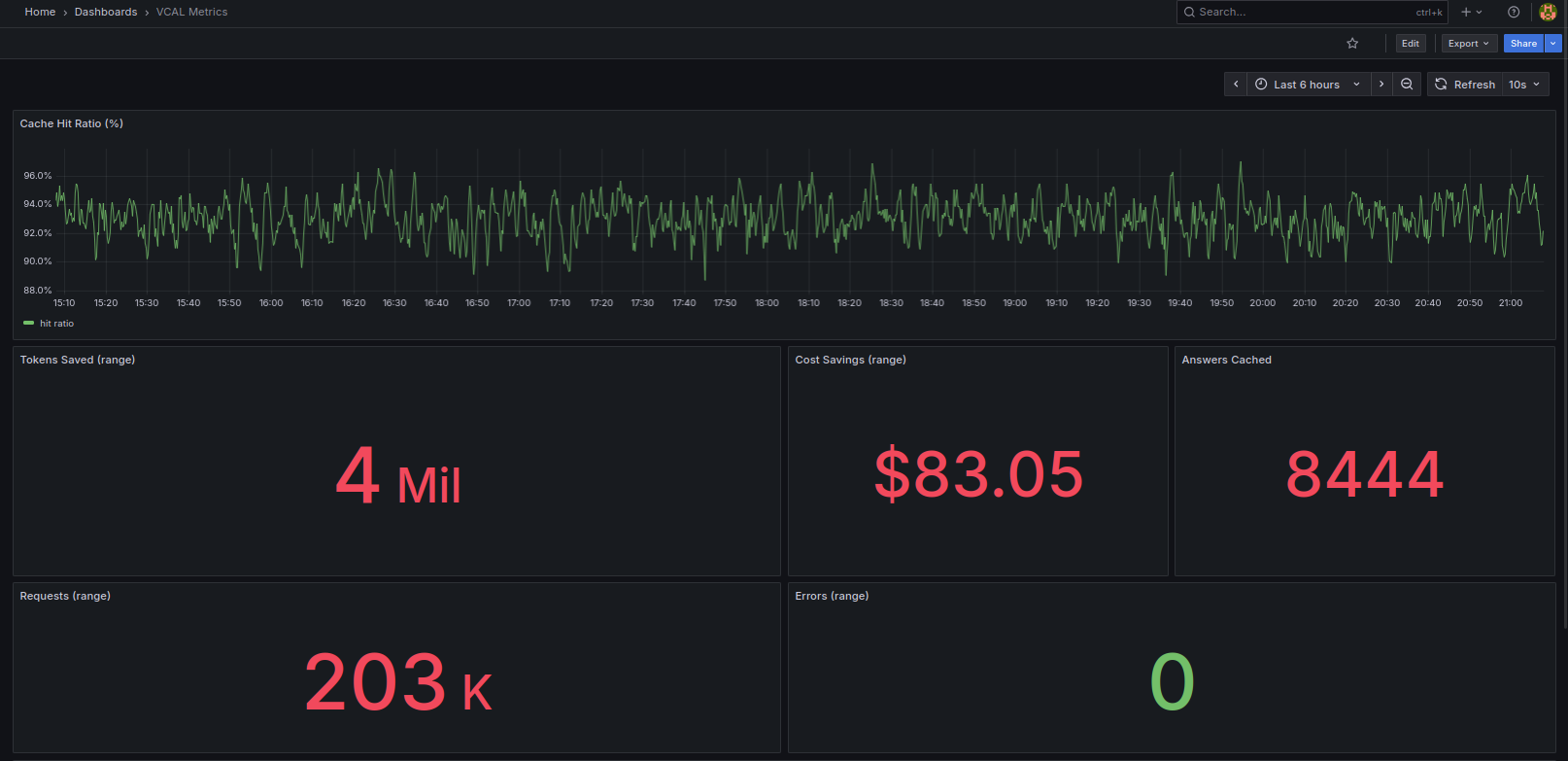
One of the integrated features of the AI Cost Firewall is its built-in monitoring. It consists of Prometheus for scraping the metrics and integrated Grafana Dashboard. Both services are launched automatically by docker compose using preconfigured Prometheus YAML and a prebuilt Grafana dashboard JSON, so the monitoring stack is ready immediately without any manual configuration.
Prometheus metrics allow you to track:
- number of cache hits
- semantic matches
- forwarded requests
- estimated cost savings
- active requests
You can immediately visualize these metrics with the Grafana dashboard to see exactly how much the firewall is saving in real time (with a 5-second delay to be honest).
Why it works well
AI Cost Firewall works because it targets a structural characteristic present in almost every LLM application:
- repeated user questions
- overlapping knowledge queries
- duplicated agent prompts
By caching responses and using semantic similarity search, the system converts repeated LLM calls into near-zero-cost lookups.
Why near-zero and not fully zero? Because semantic matching still requires generating embeddings for incoming queries. However, embedding costs are typically orders of magnitude lower than generating full LLM responses.
Another advantage of the firewall is its intentionally minimal architecture:
- Rust firewall gateway
- Redis for exact caching
- Qdrant for semantic caching
- Prometheus + Grafana for monitoring
This simplicity makes it easy to deploy, maintain, and scale.
When AI Cost Firewall is most effective
The biggest savings with AI Firewall occur in systems where similar questions appear frequently. You will immediately benefit from the AI Cost Firewall integration if your system includes any or several of the following components:
- customer support chatbots
- internal company knowledge assistants
- documentation Q&A systems
- developer copilots
- AI help desks
- AI Agents performing any of the above tasks
In these environments, the same core questions appear repeatedly across many users. Even when questions are phrased differently, the semantic cache can reuse the same answer multiple times.
Advanced users may also appreciate the integrated TTL (Time-to-Live) feature which allows you to set up the duration of the response kept in Redis’s memory before replaced with a newly generated one. The same feature for Qdrant is currently under development and will be introduced soon.
Try it in 60 seconds
If you want to see how AI Cost Firewall works, you can deploy the whole stack locally or on a small server in less than a minute.
Example:
git clone https://github.com/vcal-project/ai-firewall
cd ai-firewall
cp configs/ai-firewall.conf.example configs/ai-firewall.conf
nano configs/ai-firewall.conf # Replace the placeholders with your API keys
docker compose up -d
This launches:
- AI Cost Firewall
- Redis (exact cache)
- Qdrant (semantic cache)
- Prometheus (metrics scraping)
- Grafana (monitoring dashboard)
Once the containers start, simply point your OpenAI client to:
http://localhost:8080/v1
Within seconds, the gateway is ready to accept OpenAI-compatible requests. Similar to Nginx and other infrastructure gateways, you only need to add your API keys to the configuration file. From that point on, every request automatically passes through the cost-saving pipeline while previous responses are stored in Redis and Qdrant for future reuse.
Because the gateway itself is stateless, multiple firewall instances can be deployed behind a load balancer, allowing the system to scale horizontally with growing traffic.
                         ┌───────────────────────┐
                         │        Clients        │
                         │  Chatbots / Agents /  │
                         │  Internal AI Apps     │
                         └───────────┬───────────┘
                                     │
                                     ▼
                         ┌───────────────────────┐
                         │     Load Balancer     │
                         │   Nginx / HAProxy     │
                         └───────────┬───────────┘
                                     │
                ┌────────────────────┼────────────────────┐
                │                    │                    │
                ▼                    ▼                    ▼
     ┌──────────────────┐  ┌──────────────────┐  ┌──────────────────┐
     │ AI Cost Firewall │  │ AI Cost Firewall │  │ AI Cost Firewall │
     │    instance 1    │  │    instance 2    │  │    instance 3    │
     └─────────┬────────┘  └─────────┬────────┘  └─────────┬────────┘
               │                     │                     │
               └─────────────┬───────┴───────────┬─────────┘
                             │                   │
                             ▼                   ▼
                 ┌──────────────────┐   ┌──────────────────┐
                 │   Redis / Valkey │   │      Qdrant      │
                 │  Exact cache     │   │  Semantic cache  │
                 └─────────┬────────┘   └─────────┬────────┘
                           │                      │
                           └──────────┬───────────┘
                                      │
                                      ▼
                         ┌───────────────────────┐
                         │  Upstream LLM API     │
                         │ OpenAI / Azure / vLLM │
                         └───────────────────────┘


     ┌─────────────────────── Observability Stack ─────────────────┐
     │                                                             │
     │  AI Cost Firewall metrics ─────► Prometheus ─────► Grafana  │
     │                                                             │
     └─────────────────────────────────────────────────────────────┘
Architecture of a horizontally scalable AI Cost Firewall deployment.
Conclusion
With the growing adoption of AI, it is sometimes painful to watch the steady increase of company expenses related to LLM tokens. Large Language Models are extremely powerful, but they can also become quite expensive when used at scale. It feels even more unfair when you realize that a significant portion of LLM traffic consists of repeated or semantically similar questions.
AI Cost Firewall addresses this inefficiency with a simple idea: do not send the same or similar question to the model again and again. Instead, reuse answers that were already generated for identical or semantically similar queries.
By combining exact caching with semantic similarity search, the firewall allows previously generated answers to be reused safely and efficiently. The result is lower token consumption, faster responses, and reduced infrastructure costs.
Because the gateway is OpenAI-compatible, integration requires only a small configuration change. No application refactoring is needed. If your system includes chatbots, knowledge assistants, developer copilots, or AI agents that answer recurring questions, AI Cost Firewall can reduce token usage by 30–75% immediately after deployment.
And since the entire stack runs with a single docker compose command, you can try it in minutes.
Sometimes the most effective optimization is not a new model, a larger GPU cluster, or a complex architecture.
Sometimes it is simply not paying twice for the same answer.
If you find this open-source project useful, a GitHub star will help the project grow.