Put VCAL in front of your LLM. Repeated or similar prompts get answered from your private cache with millisecond latency. New prompts go to the model as usual — and VCAL learns them for next time.
Core engine is open source: vcal-core. Production service is commercial: VCAL Server.
VCAL follows an open-core model: the indexing engine is public and auditable, while the production server ships as signed binaries/containers.
High-performance Rust library for semantic caching. Embeddable and auditable.
Production-ready semantic cache service built on vcal-core. Adds observability, licensing, and support.
VCAL Server is the production HTTP service built on vcal-core. It adds licensing, observability, and deployable artifacts (signed binaries + containers).
Run VCAL Server as a binary or in Docker. Trial licensing is automatic: request a code, verify it, and VCAL writes a signed license file.
# 0) Create a persistent host directory (data + license)
mkdir -p ./vcal-data

# If you see "Permission denied" on Linux (container runs as UID 10001):
sudo chown -R 10001:10001 ./vcal-data

# 1) Request a 30-day trial code (runs inside the image)
docker run --rm -it \
  -v "$(pwd)/vcal-data:/var/lib/vcal" \
  -e VCAL_LICENSE_PATH=/var/lib/vcal/license.json \
  ghcr.io/vcal-project/vcal-server:latest \
  license trial <your_email>

# 2) Verify the code and write the license file to ./vcal-data/license.json
docker run --rm -it \
  -v "$(pwd)/vcal-data:/var/lib/vcal" \
  -e VCAL_LICENSE_PATH=/var/lib/vcal/license.json \
  ghcr.io/vcal-project/vcal-server:latest \
  license verify <code>

# Confirm the license exists
ls -la ./vcal-data && jq . ./vcal-data/license.json

# 3) Start VCAL Server with the same persisted directory mounted
docker run --rm -p 8080:8080 \
  -v "$(pwd)/vcal-data:/var/lib/vcal" \
  -e VCAL_LICENSE_PATH=/var/lib/vcal/license.json \
  -e VCAL_DIMS=768 \
  -e VCAL_CAP_MAX_BYTES=8589934592 \
  -e RUST_LOG=info \
  ghcr.io/vcal-project/vcal-server:latest

# 4) Health check
curl -fsS http://localhost:8080/healthz && echo "OK"
# 1) Download and unpack
tar -xzf vcal-server-linux-*.tar.gz
chmod +x vcal-server

# Optional system install:
# sudo install -m 0755 vcal-server /usr/local/bin/vcal-server

# 2) First start (no license yet): shows how to get a trial
export VCAL_DIMS=768   # set dims supported by your app
./vcal-server
# (or `vcal-server` if installed system-wide)

# 3) Request a 30-day trial code (sent to your email)
# Option A (recommended, no sudo): write license to a user-writable location
export VCAL_LICENSE_PATH="$PWD/license.json"
./vcal-server license trial <your_email>

# Option B (system-wide): write to /etc/vcal/license.json (requires sudo)
# sudo VCAL_PENDING_EMAIL_PATH=/etc/vcal/pending_email.txt ./vcal-server license trial <your_email>

# 4) Verify the code and write the license file
# Option A (no sudo, continued)
./vcal-server license verify <code>

# Option B (system-wide)
# sudo VCAL_PENDING_EMAIL_PATH=/etc/vcal/pending_email.txt ./vcal-server license verify <code>

# 5) Start VCAL Server with the license
./vcal-server
# (if you used Option A above, keep VCAL_LICENSE_PATH set in the environment)

# 6) Health check
curl -fsS http://localhost:8080/healthz && echo "OK"
VCAL sits in front of your LLM. If a similar question was answered before, VCAL returns it immediately. Otherwise, you call the model and store the result.
VCAL integrates as a lightweight HTTP cache in front of any LLM provider.
#!/usr/bin/env python3
"""
Minimal VCAL integration (no SDK required)

Flow:
1) Create an embedding vector for the user question (Ollama embeddings).
2) Ask VCAL Server /v1/qa with that vector.
3) If cache miss: call your LLM (placeholder), then /v1/upsert to store the answer.
"""
import os
import hashlib
import requests

VCAL_BASE = os.getenv("VCAL_URL", "http://127.0.0.1:8080").rstrip("/")
VCAL_KEY  = os.getenv("VCAL_API_KEY", "")

OLLAMA_URL  = os.getenv("OLLAMA_URL", "http://127.0.0.1:11434").rstrip("/")
EMBED_MODEL = os.getenv("EMBED_MODEL", "nomic-embed-text")

SIM_THRESHOLD = float(os.getenv("VCAL_SIM_THR", "0.85"))
EF_SEARCH     = int(os.getenv("VCAL_EF_SEARCH", "128"))

HEADERS = {"Content-Type": "application/json"}
if VCAL_KEY:
    HEADERS["X-VCAL-Key"] = VCAL_KEY

def embed_text(text: str) -> list[float]:
    r = requests.post(f"{OLLAMA_URL}/api/embeddings",
                      json={"model": EMBED_MODEL, "prompt": text},
                      timeout=30)
    r.raise_for_status()
    vec = r.json().get("embedding")
    if not isinstance(vec, list) or not vec:
        raise RuntimeError("Bad embedding response")
    return vec

def ext_id_for(q: str) -> int:
    h = hashlib.blake2b(q.strip().lower().encode("utf-8"), digest_size=8).digest()
    return int.from_bytes(h, "big", signed=False)

def vcal_qa(vec: list[float]) -> dict:
    r = requests.post(f"{VCAL_BASE}/v1/qa",
                      headers=HEADERS,
                      json={"query": vec, "k": 1, "ef": EF_SEARCH, "sim_threshold": SIM_THRESHOLD},
                      timeout=30)
    r.raise_for_status()
    return r.json()

def vcal_upsert(ext_id: int, vec: list[float], answer: str) -> None:
    r = requests.post(f"{VCAL_BASE}/v1/upsert",
                      headers=HEADERS,
                      json={"ext_id": ext_id, "vector": vec, "answer": answer},
                      timeout=30)
    r.raise_for_status()

def call_llm_fallback(question: str) -> str:
    return f"(LLM fallback) Answer to: {question}"

def main():
    q = input("Ask a question: ").strip()
    if not q:
        return

    vec = embed_text(q)
    qa = vcal_qa(vec)

    if qa.get("hit") and qa.get("answer"):
        print("VCAL HIT")
        print(qa["answer"])
        return

    print("VCAL MISS -> calling LLM fallback…")
    ans = call_llm_fallback(q)
    vcal_upsert(ext_id_for(q), vec, ans)
    print("Stored in VCAL")
    print(ans)

if __name__ == "__main__":
    main()
VCAL does not replace your LLM — it reduces repeat calls and latency.
See docs for
auth headers, batching, and production patterns.
VCAL Server is a vector cache. Your app must embed text (any provider) and send vectors to /v1/qa.
Reduce paid model calls, keep answers inside your perimeter, and prove the ROI in dashboards.
Serve repeats from cache instead of paying your LLM again and again.
Lower tail latency on repeated questions — users feel the difference instantly.
Run on-prem or in VPC. With VCAL Server: metrics, snapshots, auth, and enterprise options.
Use the ROI calculator below. Jump to ROI.
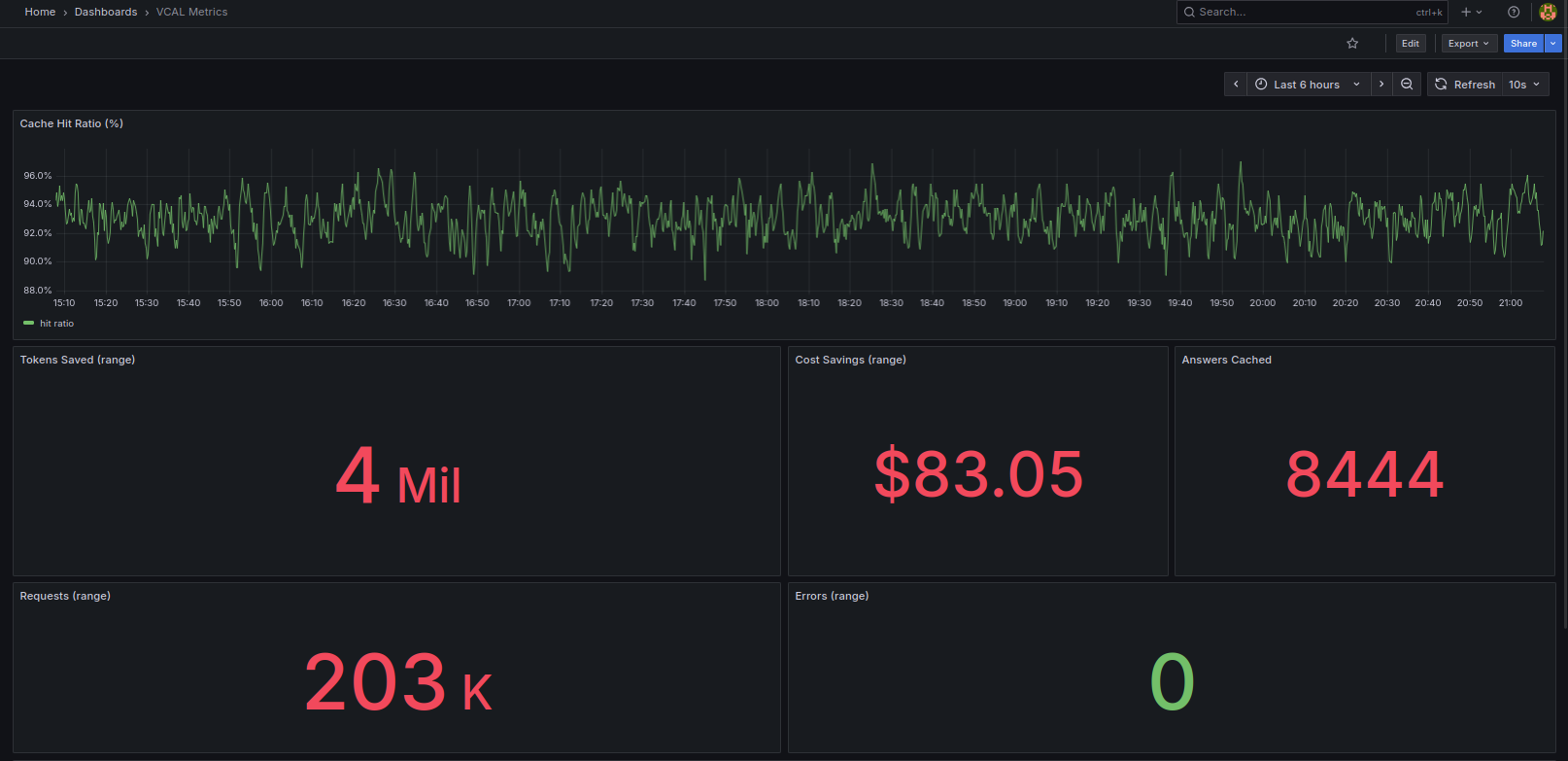
Cache hit ratio, tokens saved, cost savings, answers cached, and requests number from a single-node VCAL Server.
Estimate monthly savings assuming cache hits skip paid LLM calls.
Open source core: vcal-core. Production service: VCAL Server.
Full-feature VCAL Server for hands-on evaluation in your environment.
Self-serve 30-day trial issued via the CLI. See Quickstart
Production license for running VCAL Server in live workloads.
Security, scale, and SLAs.
No. Point your app to VCAL first and measure hit-rate and savings within days.
No. VCAL runs on-prem or in your VPC. Your perimeter, your data.
Yes. Model-agnostic. Keep using OpenAI, Anthropic, Ollama, HF, etc.
The engine (vcal-core) is open source. VCAL Server is the production service with licensing, observability, and support.
Trial is self-serve via CLI (see Quickstart).
Growth and Enterprise licenses are issued on request — contact us for pricing, security, or procurement.
VCAL follows an open-core model. The core engine is open source and auditable. VCAL Server adds production features such as licensing, observability, and enterprise security, and is distributed as signed binaries and containers.